คู่มือการใช้งานUser manual
Arxon Gold Cruiser v0.6.9
Expert Advisor (EA) สำหรับเทรดทองคำ (XAUUSD) บน MetaTrader 5 แบบอัตโนมัติ คุณตั้งระดับความเสี่ยงครั้งเดียว ที่เหลือ EA ทำเอง ตั้งแต่คำนวณขนาดไม้ เปิดออเดอร์ ใส่ stop เลื่อนกันทุน ไปจนถึงปล่อยไม้ที่วิ่งให้วิ่งต่อ เหมือน cruise control ในรถ ที่รถรักษาความเร็วให้ แต่คนขับยังต้องนั่งหลังพวงมาลัย อ่านคู่มือนี้ให้จบก่อนติดตั้ง โดยเฉพาะส่วนที่ 3 (เลือกบัญชีและทุน) และส่วนที่ 9 (ผลที่ควรคาดหวัง)An Expert Advisor (EA) that trades gold (XAUUSD) on MetaTrader 5 by itself. You set the risk level once and the EA does the rest: it sizes the trades, opens them, sets every stop, moves stops to break-even and lets the winners run. Like cruise control in a car, it holds the speed for you, but the driver stays at the wheel. Read the whole manual before you install, above all Part 3 (account and capital) and Part 9 (what to expect).
ส่วนที่ 1Part 1
ทำงานอย่างไรHow it trades
Arxon Gold Cruiser เป็นระบบตามเทรนด์ ดูทองหลายกรอบเวลาจากใหญ่ลงเล็ก และเทรดตามทิศของกรอบใหญ่เท่านั้น ใช้กับ XAUUSD อย่างเดียว ทุกระยะในระบบ (stop จุดกันทุน ระยะห่างระหว่างไม้) ตั้งเป็นระยะราคาทองเป็นดอลลาร์ และทดสอบบนทองเท่านั้น จะเปิดบนกราฟกรอบเวลาไหนก็ได้ EA ใช้กรอบเวลาของตัวเองอยู่แล้วArxon Gold Cruiser is a trend-following system. It reads gold from a higher timeframe down to a lower one and only trades in the direction of the higher one. It is made for XAUUSD only: every distance in it (stops, break-even, the gap between trades) is set in dollars of gold price and was tested on gold alone. Attach it to any chart timeframe; it uses its own timeframes.
1ทิศทาง (Direction)Direction
EA หาทิศของทองจากกรอบเวลาใหญ่ก่อน ถ้ายังไม่มีทิศที่ชัด EA จะไม่เทรด ถึงตลาดจะวิ่งก็ตาม การ์ดบนกราฟแสดงทิศปัจจุบันในแถว DirectionThe EA first finds gold’s direction on the higher timeframe. With no clear direction it does not trade, even if the market moves. The card on the chart shows the current direction in the Direction row.
2จังหวะเข้า (Setup และ Trigger)Setup and trigger
เมื่อมีทิศแล้ว EA รอให้กรอบกลางเข้าตำแหน่ง (Setup) และกรอบเล็กให้จังหวะ (Trigger) ไปทางเดียวกัน แล้วเปิดเป็นชุด (basket) ครั้งละหลายไม้ เปิดได้สูงสุด 2 ชุดพร้อมกัน ชุดที่สองต้องห่างจากชุดแรกพอสมควร และมีช่วงพักหลังเปิดแต่ละครั้ง EA ไม่เข้าเมื่อ spread กว้างเกินที่ตั้งไว้With a direction in place, the EA waits for the middle timeframe to line up (Setup) and the lower one to give the timing (Trigger) in the same direction, then opens a basket of several trades at once. At most two baskets are open together; the second must be a set distance from the first, and there is a pause after each entry. It does not enter while the spread is wider than its limit.
- กรอบใหญ่ให้ทิศ กรอบกลางเข้าตำแหน่ง และกรอบเล็กให้จังหวะไปทางเดียวกัน EA จึงเปิดชุด การ์ดเปลี่ยนจาก READY เป็น IN TRADE
- กรอบกลางยังสวนทาง EA ไม่เข้า การ์ดขึ้น NO TRADE · setup disagrees ถ้ากรอบใหญ่ยังไม่มีทิศ การ์ดขึ้น NO TRADE · no direction
ภาพจำลองเพื่อดูลำดับเท่านั้น ไม่ใช่สัญญาณจริง
- The higher timeframe gives the direction, the middle one lines up and the lower one gives the timing, all the same way: the EA opens a basket and the card goes from READY to IN TRADE.
- The middle timeframe still points the other way: no entry, and the card shows NO TRADE · setup disagrees. With no direction on the higher timeframe it shows NO TRADE · no direction.
A sketch of the order of checks, not a real signal.
3การออกExits
ทุกไม้มี stop ตั้งแต่เปิด เมื่อไม้ไปทางกำไรระยะหนึ่ง stop จะเลื่อนมาที่จุดกันทุนบวกนิดหน่อย ไม้ที่วิ่งไกลจะมี stop ตามหลัง (trailing) และล็อกกำไรส่วนหนึ่งไว้ และ EA จะออกเมื่อทิศของกรอบใหญ่กลับข้าง ไม่มีเป้ากำไรตายตัว เพราะกำไรของทั้งปีมาจากไม้ไม่กี่ไม้ที่ปล่อยให้วิ่งได้ไกลEvery trade has a stop from the moment it opens. Once a trade has moved far enough into profit, the stop goes to break-even plus a little. Trades that run far get a trailing stop and a profit lock, and the EA exits when the higher timeframe turns against the trade. There is no fixed take-profit, because the year’s profit comes from a few trades that are allowed to run far.
- เปิดไม้พร้อม stop ทันที
- ไปทางกำไรระยะหนึ่ง stop เลื่อนมาที่จุดกันทุนบวกนิดหน่อย จากตรงนี้ไม้นี้ไม่ขาดทุนแล้ว (การ์ด: Protected)
- ไม้ที่วิ่งไกล stop ตามราคาขึ้นไปเป็นขั้น ๆ
- ราคากลับมาชน stop ปิดได้กำไร ป้าย BE/Trail หรือถ้าทิศของกรอบใหญ่กลับข้างก่อน EA ปิดเอง ป้าย Auto-cut
ภาพจำลอง ไม่ใช่ระยะจริงของ EA
- The trade opens with a stop at once.
- Once it is far enough in profit, the stop moves to break-even plus a little; from here the trade cannot lose (card: Protected).
- A trade that runs far gets a stop that follows the price up in steps.
- The price comes back to the stop: closed in profit, label BE/Trail. If the higher timeframe turns first, the EA closes it itself: label Auto-cut.
A sketch, not the EA's real distances.
4ตัวกันขาดทุนรายวัน (Daily guard)The daily guard
ถ้า equity ลดลงจากยอดเงินต้นวันเกินขีดของระดับความเสี่ยง (Very Low 4% · Low 5% · Normal 7.5% · High 10%) EA จะปิดทุกไม้ของตัวเองและหยุดเปิดไม้ใหม่จนถึงวันใหม่ของ server ค่านี้จำไว้แม้ปิด-เปิด MT5 ใหม่ระหว่างวันIf equity falls below the day-start balance by more than the risk level’s limit (Very Low 4% · Low 5% · Normal 7.5% · High 10%), the EA closes all its trades and opens no new ones until the next server day. It remembers this even if MT5 is restarted during the day.
- equity ระหว่างวันลดลงจากทุนต้นวันถึงขีดของระดับ (ภาพนี้คือ Normal 7.5%) EA ปิดทุกไม้ทันที
- การ์ดขึ้น
PAUSED · daily guardไม่เปิดไม้ใหม่จนจบวันของ server รีสตาร์ท MT5 ก็ไม่ปลดล็อก - วันใหม่ของ server เริ่ม EA ใช้ทุนต้นวันใหม่ และเทรดต่อเอง
ภาพนี้อธิบายหลักการ ไม่ใช่ผลเทรดจริง
- During the day, equity falls from the day-start balance to the level's limit (here Normal, 7.5%): the EA closes all its trades at once.
- The card shows
PAUSED · daily guard; no new trades until the server day ends. Restarting MT5 does not unlock it. - The next server day starts: the EA takes the new day-start balance and trades again by itself.
An illustration of the rule, not real results.
ส่วนที่ 2Part 2
ก่อนเริ่มBefore you start
- MetaTrader 5 บนคอมพิวเตอร์MetaTrader 5 on a computer
EA ทำงานบน MT5 ตัวเต็ม (หรือบน VPS) ไม่ทำงานบนแอปมือถือ แต่ดูบัญชีจากมือถือได้ตามปกติThe EA runs in the full MT5 terminal (or on a VPS). It does not run in the phone app, though you can still watch the account from your phone.
- บัญชีที่มีทองคำ (XAUUSD) แบบ hedgingA hedging account with gold (XAUUSD)
EA ดูแลแต่ละไม้แยกกัน จึงต้องใช้บัญชีแบบ hedging (บัญชี MT5 รายย่อยส่วนใหญ่เป็นแบบนี้) ผลทดสอบทั้งหมดทำบน HFM โบรกเกอร์อื่นใช้ได้ แต่ spread และการส่งคำสั่งต่างกัน ผลจึงอาจต่างจากที่ทดสอบไว้The EA manages each trade on its own, so the account must be a hedging account (most retail MT5 accounts are). All tests were run on HFM. Other brokers work, but spreads and execution differ, so results may differ from the tests.
- ทุนตามส่วนที่ 3Capital as in Part 3
ทุนขั้นต่ำขึ้นกับระดับความเสี่ยงและชนิดบัญชี ดูส่วนที่ 3 ก่อนฝากเงินThe minimum depends on the risk level and the account type. Read Part 3 before you deposit.
- เปิดเครื่องไว้ตลอด หรือใช้ VPSAlways on, or a VPS
ไม้ที่ทำกำไรให้ทั้งปีถือเฉลี่ยราววันครึ่ง ถ้าปิด MT5 ไม้ที่เปิดอยู่จะไม่มีใครเลื่อน stop หรือล็อกกำไรให้ แนะนำ VPS ที่อยู่ใกล้ server ของโบรกเกอร์The trades that pay for the year are held about a day and a half. With MT5 closed, nothing moves their stops or locks their profit. A VPS close to your broker’s server is recommended.
- License key หรือบัญชี demoA license key, or a demo account
บัญชีจริงต้องใช้ key จากหน้าสมาชิกบน arxonedge.com บัญชี demo ทดลองได้ 14 วันโดยไม่ต้องใช้ key (ส่วนที่ 7)A real account needs a key from your member page on arxonedge.com. A demo account can try it for 14 days with no key (Part 7).
ส่วนที่ 3Part 3
เลือกบัญชีและทุนAccount and capital
1ขนาดของ EA คือ "จำนวนไม้ × จำนวนชุด"Size means trades × baskets
ขนาดเขียนเป็น ไม้ต่อชุด × จำนวนชุด เช่น 1×2 คือชุดละ 1 ไม้ เปิดได้ 2 ชุด ขนาดเต็มคือ 3×2 แต่ละไม้เริ่มที่ 0.01 lot เมื่อทุนโตพอ ขนาดจะขยับจาก 1×1 ไป 1×2, 2×2 แล้ว 3×2 หลังจากนั้น lot จึงโตตามทุน EA คำนวณขนาดวันละครั้งตอนเริ่มวันของ server จากยอดเงินต้นวัน ฝากหรือถอนระหว่างวันจะมีผลวันถัดไปSize is written as trades per basket × baskets: 1×2 means one trade per basket and up to two baskets. Full size is 3×2. Each trade starts at 0.01 lot. As the balance grows, size steps from 1×1 to 1×2, 2×2 and 3×2; after that the lot grows with the balance. The EA sets the size once a day, at the start of the server day, from that day’s starting balance, so a deposit or withdrawal counts from the next day.
2ระดับความเสี่ยงและทุนขั้นต่ำ (บัญชีปกติ, USD)Risk levels and minimum capital (standard account, USD)
ทุนขั้นต่ำมาจาก drawdown ที่ลึกที่สุดที่เจอในการทดสอบ บวกเผื่อไว้อีกราว 11% แล้วคูณด้วยตัวคูณของแต่ละระดับ ระดับต่ำกว่าจึงต้องใช้ทุนมากกว่าสำหรับขนาดเดียวกัน แต่ drawdown คิดเป็นสัดส่วนของทุนน้อยกว่าEach minimum is the deepest drawdown seen in testing, plus about 11% for safety, times the level’s multiplier. So a lower level needs more money for the same size, and the same drawdown is a smaller share of the account.
| ระดับLevel | 1×1 | 1×2 | 2×2 | 3×2 | ตัวกันรายวันDaily guard | drawdown ที่ทุนขั้นต่ำ (โดยประมาณ)Drawdown at the minimum (approx.) |
|---|---|---|---|---|---|---|
| Very Low | $7,000 | $7,900 | $15,300 | $24,500 | 4% | ราว 7% ของทุนabout 7% of the balance |
| Low | $1,000 | $1,200 | $2,200 | $3,500 | 5% | ราวครึ่งหนึ่งของทุนabout half the balance |
| Normal | $800 | $900 | $1,700 | $2,700 | 7.5% | ราวสองในสามของทุนabout two-thirds of the balance |
| High | $500 | $600 | $1,100 | $1,800 | 10% | เกือบเท่าทุนclose to the whole balance |
ค่าเริ่มต้นและที่แนะนำคือ Normal ตัวเลข drawdown เป็นกรณีที่เคยเจอในการทดสอบตอนทุนอยู่ที่ขั้นต่ำของขนาดนั้นพอดี ทุนที่มากกว่าขั้นต่ำจะมี drawdown เป็นสัดส่วนน้อยลง และอนาคตอาจลึกกว่าที่เคยเจอ Very Low ใช้ไม้เล็กที่สุดต่อทุน drawdown จึงเป็นสัดส่วนของทุนน้อยที่สุด แต่กำไรเป็นสัดส่วนของทุนก็น้อยลงตามกัน เหมาะกับทุนตั้งแต่ $7,000 ที่ต้องการให้ยอดเงินแกว่งน้อย ระดับนี้ไม่มีโหมดทุนต่ำThe default, and our recommendation, is Normal. The drawdown column is the worst seen in testing with the balance exactly at that size’s minimum. More capital than the minimum makes it a smaller share; the future can be deeper than anything seen so far. Very Low uses the smallest trades for the balance, so its drawdown is the smallest share of the account, and its profit as a share of the account is smaller to match. It suits balances from $7,000 where you want the account to swing less. It has no low-capital mode.
3บัญชีปกติหรือบัญชี centStandard or cent account
บัญชี cent ใช้หน่วย USC (1 USC = 0.01 ดอลลาร์) ตัวเลขทุนขั้นต่ำทั้งหมดในตารางข้างบนใช้ได้เหมือนเดิมแต่เป็น USC เช่น Normal 1×2 ใช้ 900 USC (เงินจริง $9) ความเสี่ยงคิดเป็นสัดส่วนเท่ากับบัญชีปกติ แต่ spread ของบัญชี cent กว้างกว่า ในการทดสอบ บัญชี cent ได้กำไรราว 83% ของบัญชีปกติที่ lot เท่ากันA cent account counts in USC (1 USC = $0.01). Every minimum in the table above holds, in USC: Normal 1×2 needs 900 USC, which is $9 of real money. The risk as a share of the account is the same as on a standard account, but cent spreads are wider: in testing, a cent account made about 83% of a standard account’s profit at the same lot.
| ทุน (เงินจริง)Capital (real money) | แนะนำWe recommend | เหตุผลWhy |
|---|---|---|
| ต่ำกว่า $9Under $9 | เติมให้ถึง $9 แล้วใช้บัญชี centTop up to $9, then a cent account | ต่ำกว่านี้ใช้ได้แค่ High หรือโหมดทุนต่ำ เสี่ยงหมดบัญชีBelow this only High or the low-capital mode work, which risk the whole account |
| $9 – $299 | บัญชี centCent account | บัญชีปกติไม่รองรับทุนต่ำกว่า $300A standard account does not trade under $300 |
| $300 – $899 | บัญชี centCent account | บนบัญชี cent ใช้ Normal ขนาดเต็มได้ บัญชีปกติยังเทรดได้ แต่ต้องใช้ High ลดขนาด หรือโหมดทุนต่ำ ซึ่ง drawdown ที่เคยเจอเกือบเท่าหรือเกินทุนA cent account runs Normal at full size. A standard account still trades here, but only through High, a smaller size or the low-capital mode, where the drawdowns seen came close to, or beyond, the whole balance |
| $900 ขึ้นไป$900 and up | บัญชีปกติStandard account | ความเสี่ยงเท่ากัน แต่ spread ถูกกว่า กำไรมากกว่าSame risk, lower spread, more profit |
บัญชี cent: ค่า Max lot เริ่มต้น 1.00 จะหยุดการโตของ lot ที่ทุนราว 261,500 USC ($2,615) บนระดับ Normal ถ้าทุนโตเกินนั้น ให้ย้ายไปบัญชีปกติ หรือเพิ่ม Max lot เองCent accounts: the default Max lot of 1.00 stops the lot growing at about 261,500 USC ($2,615) on Normal. Beyond that, move to a standard account or raise Max lot yourself.
ส่วนที่ 4Part 4
ติดตั้งInstalling
1วางไฟล์ EACopy the EA file
ใน MT5 กด File → Open Data Folder เปิดโฟลเดอร์ MQL5 → Experts แล้ววางไฟล์ Arxon Gold Cruiser.ex5 ลงไป กลับมาที่ MT5 คลิกขวาที่ Expert Advisors ในหน้าต่าง Navigator แล้วกด Refresh ชื่อ Arxon Gold Cruiser จะขึ้นในรายการIn MT5, choose File → Open Data Folder, open MQL5 → Experts and copy Arxon Gold Cruiser.ex5 into it. Back in MT5, right-click Expert Advisors in the Navigator and choose Refresh. Arxon Gold Cruiser appears in the list.
- ใน MT5 กด File › Open Data Folder
- เปิด MQL5 › Experts แล้ววางไฟล์ Arxon Gold Cruiser.ex5
- กลับมาที่ MT5 คลิกขวา Expert Advisors ใน Navigator แล้วกด Refresh
- Arxon Gold Cruiser ขึ้นในรายการ (ถ้าเปิด Navigator ไม่เห็น กด Ctrl+N)
- In MT5 press File › Open Data Folder.
- Open MQL5 › Experts and copy Arxon Gold Cruiser.ex5 into it.
- Back in MT5, right-click Expert Advisors in the Navigator and press Refresh.
- Arxon Gold Cruiser appears in the list (no Navigator? press Ctrl+N).
2อนุญาต URL สำหรับตรวจสิทธิ์Allow the license URL
กด Tools → Options → Expert Advisors ติ๊ก Allow algorithmic trading และ Allow WebRequest for listed URL แล้วเพิ่มบรรทัด https://api.arxonedge.com กด OK ถ้าข้ามขั้นนี้ การ์ดจะขึ้น Allow WebRequest และ EA จะไม่เปิดไม้ใหม่บนบัญชีจริงOpen Tools → Options → Expert Advisors, tick Allow algorithmic trading and Allow WebRequest for listed URL, add https://api.arxonedge.com and press OK. Skip this and the card shows Allow WebRequest, and the EA opens no new trades on a real account.
- ใน MT5 กด Tools › Options แล้วเลือกแท็บ Expert Advisors
- ติ๊ก Allow algorithmic trading และ Allow WebRequest for listed URL
- ดับเบิลคลิกแถวว่าง พิมพ์ https://api.arxonedge.com แล้วกด Enter
- กด OK การ์ดจะเปลี่ยนจาก
Allow WebRequestเป็นActiveภายในไม่กี่วินาที
- In MT5 press Tools › Options and open the Expert Advisors tab.
- Tick Allow algorithmic trading and Allow WebRequest for listed URL.
- Double-click the empty row, type https://api.arxonedge.com and press Enter.
- Press OK. Within a few seconds the card changes from
Allow WebRequesttoActive.
3เปิดบนกราฟทองAttach it to a gold chart
เปิดกราฟ XAUUSD (บางโบรกเกอร์ใช้ชื่ออื่น เช่น GOLD หรือ XAUUSDc สำหรับบัญชี cent) กรอบเวลาไหนก็ได้ ลาก Arxon Gold Cruiser จาก Navigator มาวางบนกราฟ ที่แท็บ Common ติ๊ก Allow Algo Trading ที่แท็บ Inputs วาง license key ในช่อง License key (บัญชี demo เว้นว่างได้) เลือก Risk level แล้วกด OK ปุ่ม Algo Trading บนแถบเครื่องมือของ MT5 ต้องเป็นสีเขียวOpen an XAUUSD chart (some brokers call it GOLD, or XAUUSDc on a cent account), any timeframe. Drag Arxon Gold Cruiser from the Navigator onto the chart. On the Common tab tick Allow Algo Trading. On the Inputs tab paste your key into License key (leave it empty on a demo account), choose your Risk level and press OK. The Algo Trading button on the MT5 toolbar must be green.
- ลาก EA จาก Navigator ลงกราฟ XAUUSD แท็บ Common ติ๊ก Allow Algo Trading
- แท็บ Inputs ดับเบิลคลิกช่อง Value ของ License key แล้ววาง key (บัญชี demo เว้นว่างได้)
- เลือก Risk level (ส่วนที่ 3) แล้วกด OK
- ปุ่ม Algo Trading บนแถบเครื่องมือต้องเป็นสีเขียว ถ้าเป็นสีแดงให้กดหนึ่งครั้ง
- Drag the EA from the Navigator onto an XAUUSD chart. On the Common tab tick Allow Algo Trading.
- On the Inputs tab double-click the Value of License key and paste your key (leave it empty on a demo account).
- Choose your Risk level (Part 3) and press OK.
- The Algo Trading button on the toolbar must be green; if it is red, press it once.
4ตรวจการ์ดCheck the card
การ์ดสถานะขึ้นที่มุมกราฟ ดูว่าแถว License เป็น Active (หรือ Demo account / Trial) และขนาด lot และตัวกันรายวันตรงกับที่คาดไว้ (ส่วนที่ 6) ถ้ามีคำเตือน แก้ตามที่การ์ดบอกก่อน ปล่อยให้ EA ทำงานบนกราฟเดียวต่อบัญชีเท่านั้นThe status card appears in a corner of the chart. Check that the License row says Active (or Demo account / Trial) and that the size, lot and daily guard are what you expect (Part 6). If there is a warning, fix what it says first. Run the EA on one chart per account only.
- License ต้องเป็น
Active(หรือDemo accountบนบัญชี demo) ถ้าเป็นค่าอื่น ดูตารางสถานะสิทธิ์ในส่วนที่ 6 - Size ขนาดและ lot ตรงกับที่คาด ลองตัวเลขของคุณได้ในส่วนที่ 5 ข้อ 2 ก่อนมีราคาแรกจะขึ้น
preview - Daily guard ตรงกับระดับที่เลือก (Normal = 7.5%)
- $1 move บัญชี USD และ USC ควรเป็น 1.00
ถ้ามีบรรทัด Warning แก้ตาม Advice ก่อน บรรทัดสรุปเป็น NO TRADE · setup disagrees หรือ no direction เป็นเรื่องปกติ แปลว่ากำลังรอตลาด
- License must say
Active(orDemo accounton a demo account); anything else, see the license table in Part 6. - Size: the size and lot you expect; try your numbers in Part 5, item 2. Before the first price it shows
preview. - Daily guard matches your level (Normal = 7.5%).
- $1 move should read 1.00 on USD and USC accounts.
If a Warning line shows, follow its Advice first. A verdict of NO TRADE · setup disagrees or no direction is normal: the EA is waiting for the market.
5ถ้าใช้ VPSOn a VPS
ทำขั้นที่ 1–4 ใน MT5 บน VPS ด้วย รวมถึงการเพิ่ม URL ในขั้นที่ 2 ปล่อย EA ทำงานที่เดียว ถ้าเปิดทั้งบนเครื่องตัวเองและบน VPS กับบัญชีเดียวกัน จะเปิดไม้ซ้อนกันRepeat steps 1–4 in MT5 on the VPS, including the URL in step 2. Run the EA in one place only: running it on your own computer and on the VPS for the same account opens trades twice.
ส่วนที่ 5Part 5
ตั้งค่าSettings
กลยุทธ์ถูกล็อกไว้ในตัว EA ปรับไม่ได้ สิ่งที่ปรับได้คือขนาด ความเสี่ยง และการแสดงผล ลูกค้าส่วนใหญ่ตั้งแค่ Risk level กับ License key ที่เหลือใช้ค่าเริ่มต้น ตั้งได้ในหน้าต่าง Inputs ของ EA และส่วนใหญ่ปรับได้จากแผงตั้งค่าบนกราฟด้วย (ข้อ 3 ด้านล่าง)The strategy is fixed inside the EA. What you can set is size, risk and display. Most people set only Risk level and License key and leave the rest at the defaults. You can set them in the EA’s Inputs window or, for most of them, in the settings panel on the chart (3 below).
- SETTINGS เปิดแผงตั้งค่าบนกราฟ (ข้อ 3)
- การ์ดสถานะ อยู่มุมซ้ายล่าง ลากหัวการ์ดเพื่อย้าย (ส่วนที่ 6)
- บรรทัดสรุป บอกว่า EA กำลังทำอะไรในประโยคเดียว
- ชื่อ EA กับไอคอนหมวก มุมขวาบนของกราฟ หมวกสีฟ้าแปลว่า EA เทรดได้ ถ้าเป็นสีเทา ให้เปิดปุ่ม Algo Trading บนแถบเครื่องมือ
- SETTINGS opens the settings panel on the chart (item 3).
- The status card sits bottom-left; drag its header to move it (Part 6).
- The verdict line says what the EA is doing in one line.
- The EA name and cap icon at the top right: a blue cap means the EA may trade. If it is gray, turn on Algo Trading on the toolbar.
1ตั้งได้สองที่Two places to set it
หน้าต่าง Inputs (คลิกขวาที่กราฟ › Expert Advisors › Properties › Inputs หรือกด F7) มีทุกค่า ใช้ตอนติดตั้งและสำหรับค่าที่ตั้งไม่บ่อย · แผง SETTINGS บนกราฟ ปรับค่าที่ใช้บ่อยได้ทันทีโดยไม่ต้องเปิดหน้าต่าง การปรับในแผงมีผลกับไม้ถัดไปทันที ไม่ปิดไม้ที่เปิดอยู่The Inputs window (right-click the chart › Expert Advisors › Properties › Inputs, or F7) has every setting; use it when installing and for settings you rarely change. The SETTINGS panel on the chart changes the everyday ones at once without opening a window. A panel change applies to the next entry; it never closes open trades.
2ลองปรับค่า แล้วดูว่าการ์ดเปลี่ยนอย่างไรTry the settings and watch the card
ใส่ทุนของคุณ เลือกบัญชีปกติหรือ cent แล้วกดแผงด้านล่างเหมือนบนกราฟ การ์ดสถานะและคำอธิบายจะเปลี่ยนตาม ขนาดคำนวณแบบเดียวกับ EA v0.6.9 (จากทุนต้นวัน) ตลาดในตัวอย่างนี้ตั้งไว้ที่ฝั่งซื้อเสมอEnter your balance, pick a standard or cent account, then use the panel below as you would on the chart. The status card and the explanation follow. The size is worked out the same way as EA v0.6.9 (from the day-start balance); the market in this example is always on the buy side.
ตัวอย่างนี้ช่วยเลือกค่าเท่านั้น ไม่ใช่คำแนะนำการลงทุน ผลจริงขึ้นกับตลาดและโบรกเกอร์This only helps you pick settings; it is not investment advice. Real results depend on the market and your broker.
3แผงตั้งค่าบนกราฟThe settings panel on the chart
กดปุ่ม SETTINGS มุมขวาบนของกราฟเพื่อเปิดแผง มี 3 แท็บ: RISK (Risk level, Position sizing, lot ของ Manual, เมื่อทุนต่ำกว่าขั้นต่ำ, Low capital, Max lot) · TRADING (เปิด-ปิดการเปิดไม้ใหม่, Max spread, Session filter และชั่วโมงเริ่ม-จบ) · DISPLAY (การ์ดสถานะ รูปแบบการ์ด เครื่องหมายเทรด) ลากหัวแผงเพื่อย้ายตำแหน่ง กดลูกศรที่หัวแผงเพื่อพับเก็บClick SETTINGS at the top right of the chart to open the panel. It has three tabs: RISK (risk level, position sizing, the Manual lot, below-minimum behavior, low capital, max lot) · TRADING (new entries on or off, max spread, the session filter and its hours) · DISPLAY (status card, card style, trade marks). Drag the panel by its header; click the arrow in the header to fold it.
- มีผลทันทีกับไม้ใหม่Takes effect at once, for new trades
EA คำนวณขนาดใหม่ทันทีจากทุนต้นวัน การ์ดสถานะเปลี่ยนตาม ไม้ที่เปิดอยู่ใช้ lot เดิมจนปิดThe EA works out the size again straight away from the day-start balance and the status card updates. Open trades keep their lot until they close.
- ลดระดับความเสี่ยงระหว่างวันLowering the risk level during the day
ถ้าระดับใหม่มีตัวกันรายวันแคบกว่าเดิม (เช่น High 10% เป็น Very Low 4%) ตัวกันใหม่เริ่มวันถัดไปของ server การ์ดจะขึ้นว่า "tomorrow" เพื่อไม่ให้การเปลี่ยนค่าไปปิดไม้ที่เปิดอยู่เอง ถ้าระดับใหม่กว้างกว่า มีผลทันทีIf the new level has a tighter daily guard (for example High 10% to Very Low 4%), the new guard starts at the next server day and the card shows "tomorrow", so changing a setting never closes your open trades by itself. A wider guard applies at once.
- บันทึกไว้กับกราฟนี้Saved for this chart
ค่าที่ปรับในแผงจำไว้ตามสัญลักษณ์และ timeframe ของกราฟ ปิด MT5 แล้วเปิดใหม่ก็ยังอยู่ ถ้าไปแก้ค่าในหน้าต่าง Inputs ภายหลัง EA จะกลับไปใช้ค่าใน Inputs ทั้งหมด ปุ่ม RESET ก็กลับไปใช้ค่าใน Inputs เช่นกันPanel values are kept for the chart’s symbol and timeframe, and survive closing MT5. If you later change the Inputs window, the EA goes back to the Inputs values; RESET does the same.
- ที่ตั้งได้เฉพาะใน InputsInputs only
License key, Magic number, Max slippage, Order comment prefix และค่าใน MT5 ตั้งได้ในหน้าต่าง Inputs เท่านั้น ถ้าไม่อยากเห็นแผง ปิดได้ที่ Display › Settings panelLicense key, magic number, max slippage, the order comment prefix and the MT5 options are set in the Inputs window only. To hide the panel, turn off Display › Settings panel.
4ค่าทั้งหมดใน InputsEvery input
เรียงตามหน้าต่าง Inputs ของ EA ช่อง "ในแผง" บอกว่าปรับจากแผงบนกราฟได้ไหม ลูกค้าส่วนใหญ่ตั้งแค่ Risk level กับ License keyIn the order of the EA's Inputs window. "In the panel" tells whether the on-chart panel can change it. Most customers set only Risk level and License key.
| ช่องใน InputsInput | ค่าเริ่มต้นDefault | ทำอะไรWhat it does | ในแผงIn the panel |
|---|---|---|---|
| Risk | |||
Risk level | Normal | Very Low / Low / Normal / High เลือกว่ายอมขาดทุนลึกได้แค่ไหน กำหนดทุนขั้นต่ำของแต่ละขนาดและตัวกันรายวัน (4 / 5 / 7.5 / 10%) ดูตารางในส่วนที่ 3Very Low / Low / Normal / High: how deep a loss you accept. Sets each size's minimum capital and the daily guard (4 / 5 / 7.5 / 10%); table in Part 3. | ในแผง: In the panel: ได้Yes |
Position sizing | Auto | Auto lot โตเองเมื่อทุนต้นวันถึงขั้นถัดไป · Fixed 0.01 0.01 เสมอ · Manual lot ใช้ lot ในช่องถัดไปAuto the lot grows when the day-start balance reaches the next step · Fixed 0.01 always 0.01 · Manual lot the lot in the next field. | ในแผง: In the panel: ได้Yes |
└ Lot per ticket (Manual sizing) | 0.01 | ใช้เมื่อเลือก Manual lot เท่านั้น ขนาด (ไม้ × ชุด) ยังตรวจกับทุนเหมือนเดิม ถ้าใหญ่กว่าที่ Auto จะใช้ การ์ดจะเตือนOnly with Manual lot. The size (tickets × baskets) is still checked against the balance; the card warns when it is above what Auto would use. | ในแผง: In the panel: ได้ (เมื่อเลือก Manual)Yes (with Manual) |
When the balance is below the level's minimum | Step down to 1x1 | ทุนต่ำกว่าขั้นต่ำของ 1×2: Step down ลดเป็น 1×1 (แนะนำ) · Stop new entries หยุดเปิดไม้ใหม่ · Keep trading 1x2 เทรดต่อ (ไม่แนะนำ)Under the 1×2 minimum: Step down to 1×1 (recommended) · Stop new entries · Keep trading 1x2 (not recommended). | ในแผง: In the panel: ได้Yes |
Allow low capital from $300 (not recommended) | false | บัญชีปกติทุนตั้งแต่ $300 แต่ต่ำกว่าขั้นต่ำ 1×1 ของระดับ (High $300–499, Normal $300–799): เทรด 1×1 ด้วยตัวกัน 10% ไม่แนะนำ ในการทดสอบที่เริ่มในเดือนที่แย่ drawdown ลึกราว 90% ของทุน ใช้บัญชี cent แทน ใช้ไม่ได้กับ Very Low หรือเมื่อเลือก Stop new entriesA standard account from $300 up to the level's 1×1 minimum ($300–499 on High, $300–799 on Normal): 1×1 with a 10% guard. Not recommended: starting in a bad month, testing saw drawdowns near 90% of the balance; use a cent account. Not with Very Low or Stop new entries. | ในแผง: In the panel: ได้Yes |
Max lot per ticket | 1.00 | เพดาน lot ต่อไม้ Auto จะไม่เกินค่านี้ บนบัญชี cent ระดับ Normal ทุนโตเกินราว 261,500 USC ให้ย้ายไปบัญชีปกติหรือเพิ่มค่านี้The cap per ticket; Auto never goes above it. On a cent account on Normal past about 261,500 USC, move to a standard account or raise it. | ในแผง: In the panel: ได้Yes |
| License | |||
License key (demo accounts: leave empty) | (ว่าง)(empty) | key จากหน้าสมาชิก › EA license บัญชี demo เว้นว่างได้ ส่วนที่ 7The key from Account › EA license. Leave it empty on a demo account. Part 7. | ในแผง: In the panel: — |
| Trading | |||
Trading (new entries) | true | ปิดเพื่อหยุดเปิดไม้ใหม่ ไม้ที่เปิดอยู่ EA ยังดูแลจนปิดOff stops new entries; open trades are still managed until they close. | ในแผง: In the panel: ได้Yes |
Magic number | 2611131 | เลขประจำออเดอร์ของ EA เปลี่ยนเฉพาะเมื่อ EA อื่นใช้เลขเดียวกัน ห้ามเปลี่ยนขณะมีไม้เปิดThe EA's order number. Change it only if another EA uses the same one, never with trades open. | ในแผง: In the panel: — |
Max spread $ (0 = off) | 0.60 | ไม่เข้าไม้เมื่อ spread กว้างกว่านี้ (การ์ด: Result blocked · spread) ในแผงปรับทีละ $0.05 สูงสุด $3No entry while the spread is wider (card: Result blocked · spread). Steps of $0.05 up to $3 in the panel. | ในแผง: In the panel: ได้Yes |
Max slippage (points) | 300 | ยอมให้ราคาคลาดจากที่ส่งคำสั่งได้เท่าไรHow far the fill may differ from the requested price. | ในแผง: In the panel: — |
Session filter (server time) | false | เปิดแล้วเข้าไม้เฉพาะช่วงชั่วโมงที่ตั้ง ผลทดสอบทั้งหมดในคู่มือนี้ปิดตัวกรองนี้On: entries only within the hours below. Every test in this manual ran with it off. | ในแผง: In the panel: ได้Yes |
└ Session start hour · └ Session end hour | 1 · 22 | ชั่วโมงเริ่มและจบ ตามเวลาของ server โบรกเกอร์ ไม่ใช่เวลาไทยStart and end hour in the broker server's time, not your local time. | ในแผง: In the panel: ได้ (เมื่อเปิด Session)Yes (with Session on) |
Order comment prefix | AGC | ข้อความหน้าคอมเมนต์ของออเดอร์ ไว้แยกออเดอร์ใน HistoryText in front of the order comment, to tell orders apart in History. | ในแผง: In the panel: — |
| Display | |||
Settings panel on the chart | true | ปิดแล้วไม่มีปุ่ม SETTINGS และแผงบนกราฟ ตั้งค่าใน Inputs แทนOff: no SETTINGS button or panel on the chart; use Inputs instead. | ในแผง: In the panel: — |
Status | true | เปิด-ปิดการ์ดสถานะ ไม่มีผลกับการเทรดShows or hides the status card; no effect on trading. | ในแผง: In the panel: ได้Yes |
Style | Auction card | Auction card การ์ดกระจก ลากได้ พับได้ · Pine table ตารางเล็กติดมุมกราฟAuction card glass card you can drag and fold · Pine table a small table fixed to a corner. | ในแผง: In the panel: ได้Yes |
Table position (Pine table style) · Table text size | Bottom Left · Small | ใช้กับแบบ Pine table เท่านั้น เลือกได้ 9 ตำแหน่ง และ Tiny / Small / Normal / LargePine table only: 9 positions, and Tiny / Small / Normal / Large. | ในแผง: In the panel: — |
Trade marks | true | ลูกศรเปิดไม้ เครื่องหมายปิดไม้ เส้นประเชื่อม และป้ายกำไร/ขาดทุนกับเหตุที่ปิด ชี้เมาส์ที่เครื่องหมายเพื่อดูรายละเอียดOpen arrow, close mark, dotted link and a P/L label with the exit reason; hover a mark for details. | ในแผง: In the panel: ได้Yes |
Trade mark: buy open · sell open · closed in profit · closed at a loss | ฟ้า · แดง · เขียว · ส้มblue · red · lime · orange | สีของเครื่องหมายแต่ละแบบThe color of each kind of mark. | ในแผง: In the panel: — |
Trade mark arrow size (1-5) · dotted open -> close line · P/L + exit reason label | 2 · true · true | ขนาดลูกศร และเปิด-ปิดเส้นประกับป้ายกำไร/ขาดทุนArrow size, and the dotted line and the P/L label on or off. | ในแผง: In the panel: — |
Trade marks: redraw last N days on attach | 30 | ตอนติดตั้ง EA วาดเครื่องหมายของเทรดย้อนหลังกี่วันHow many days of past trades are marked when the EA is attached. | ในแผง: In the panel: — |
| MT5 | |||
Draw in front of candles | true | การ์ดและแผงอยู่หน้าแท่งเทียนThe card and panel sit in front of the candles. | ในแผง: In the panel: — |
Status refresh (ms) | 300 | การ์ดวาดใหม่ทุกกี่มิลลิวินาที ปกติไม่ต้องเปลี่ยนHow often the card redraws, in milliseconds; normally leave it. | ในแผง: In the panel: — |
ส่วนที่ 6Part 6
การ์ดสถานะThe status card
การ์ดบอกว่า EA กำลังทำอะไร ใช้ตรวจทุกครั้งหลังติดตั้งหรือเปลี่ยนค่า การ์ดอยู่มุมซ้ายล่างของกราฟ ลากหัวการ์ดไปวางที่อื่นได้ EA จำตำแหน่งไว้ กดลูกศรที่หัวการ์ดเพื่อพับเหลือบรรทัดเดียวThe card says what the EA is doing. Check it every time you install or change a setting. It sits at the bottom left of the chart; drag its header to move it (the EA remembers where), and click the arrow in the header to fold it to one line.
1ลองดูแต่ละสถานการณ์See each situation
กดเลือกสถานการณ์ด้านบนการ์ด ชี้ที่บรรทัดในการ์ดหรือคำอธิบายด้านข้างเพื่อดูว่าตรงกัน กด "พับ" หรือ "แบบตาราง" เพื่อดูการ์ดอีกสองแบบPick a situation above the card. Point at a line in the card or at its meaning to match them. "Folded" and "Table style" show the card's other two looks.
2บรรทัดสรุป (บนสุดของการ์ด)The verdict line (top of the card)
| บรรทัดสรุปVerdict | หมายถึงMeans | ต้องทำTo do |
|---|---|---|
READY · waiting for trigger | ทิศทางและจังหวะตรงกันแล้ว รอจังหวะเข้าสุดท้ายDirection and setup agree; waiting for the last entry signal. | ไม่ต้องทำอะไรNothing. |
IN TRADE · BUY ×n / SELL ×n | มีไม้เปิดอยู่ n ไม้n tickets are open. | ปล่อยให้ EA จัดการ ห้ามปิดหรือแก้ไม้ด้วยมือLet the EA handle them; do not close or edit by hand. |
IN TRADE · … · manage only | มีไม้เปิดอยู่แต่สิทธิ์ใช้ไม่ได้ EA ดูแลไม้เดิมจนปิด ไม่เปิดใหม่Trades are open but the license is not valid: the EA manages them to the end, nothing new. | ดูบรรทัด License แล้วแก้ตามตารางถัดไปCheck the License line and fix it (next table). |
NO TRADE · no direction | ตลาดยังไม่มีทิศทางชัดNo clear market direction. | ปกติ ไม่ต้องทำอะไรNormal; nothing. |
NO TRADE · setup disagrees | มีทิศทางแต่จังหวะยังสวนทางThere is a direction but the setup points the other way. | ปกติ ไม่ต้องทำอะไรNormal; nothing. |
NO TRADE · capital | ทุนไม่พอสำหรับระดับและค่าที่ตั้งNot enough capital for the level and settings. | ทำตามบรรทัด Advice หรือลองตัวเลขในส่วนที่ 5 ข้อ 2Follow the Advice line, or try your numbers in Part 5, item 2. |
NO TRADE · license | สิทธิ์ใช้ไม่ได้ (ไม่มี key, ยังไม่เพิ่ม URL, หมดอายุ, ไม่ถูกต้อง)The license is not valid (no key, URL not allowed, expired, wrong key). | ดูบรรทัด LicenseCheck the License line. |
PAUSED · daily guard | วันนี้ขาดทุนถึงตัวกันรายวัน ปิดทุกไม้แล้วToday's loss reached the daily guard; everything was closed. | รอวันใหม่ของ server EA เริ่มเอง รีสตาร์ทไม่ปลดล็อกWait for the next server day; it resumes by itself. A restart does not unlock it. |
WAITING · first tick | ยังไม่มีราคาแรกของวัน (เพิ่งติดตั้ง หรือตลาดปิด) ขนาดเป็น previewNo tick yet this server day (just attached, or the market is closed); the size is a preview. | รอตลาดเปิดWait for the market. |
TRADING OFF | ปิด Trading ไว้Trading is switched off. | เปิดที่แผง TRADING › Trading หรือใน InputsTurn it on in panel TRADING › Trading or in Inputs. |
3สถานะสิทธิ์ (บรรทัด License)License states (the License line)
ทุกสถานะที่ไม่ใช่ Active, Demo account หรือ Offline · ok to จะหยุดเปิดไม้ใหม่ แต่ยังดูแลไม้ที่เปิดอยู่Every state other than Active, Demo account or Offline · ok to stops new entries; open trades are still managed.
| License | หมายถึงMeans | ต้องทำTo do |
|---|---|---|
Active · to (date) | ใช้งานได้ถึงวันที่นั้น EA ตรวจซ้ำทุก 6 ชั่วโมงValid until that date; checked again every 6 hours. | —— |
Demo account | บัญชี demo ไม่ต้องใช้ keyA demo account; no key needed. | — |
Strategy Tester | กำลังทดสอบใน Strategy Tester ไม่ต้องใช้ keyRunning in the Strategy Tester; no key needed. | — |
Checking… | กำลังตรวจครั้งแรก ถ้า server ตอบช้าจะลองใหม่ใน 30 วินาทีFirst check in progress; if the server is slow it retries in 30 seconds. | รอไม่กี่วินาทีWait a few seconds. |
Offline · ok to (time) | ติดต่อ server ไม่ได้ แต่ผลล่าสุดยังใช้ได้ถึงเวลานั้น (สูงสุด 72 ชั่วโมง)The server cannot be reached; the last good answer holds until that time (up to 72 hours). | ตรวจอินเทอร์เน็ตของเครื่องหรือ VPSCheck the PC or VPS internet. |
Offline · not verified | ติดต่อ server ไม่ได้และยังไม่เคยตรวจผ่านCannot reach the server and never verified. | ตรวจอินเทอร์เน็ตและ URL ที่อนุญาตCheck the internet and the allowed URL. |
Allow WebRequest | MT5 ยังไม่อนุญาต URL ตรวจสิทธิ์ (บรรทัด Add URL บอก URL)MT5 does not allow the license URL yet (the Add URL line shows it). | ทำตามภาพในส่วนที่ 4 ขั้นที่ 2Follow the picture in Part 4, step 2. |
No key | บัญชีจริงแต่ยังไม่ใส่ License keyA real account with no License key. | วาง key จากหน้าสมาชิกใน InputsPaste the key from your account page into Inputs. |
Not valid | key ไม่ถูกต้อง หรือผูกกับบัญชีอื่นแล้ว เหตุผลอยู่ในแท็บ Experts ของ ToolboxWrong key, or bound to another account; the reason is in the Toolbox Experts tab. | ตรวจ key หรือกด Move account ที่หน้าสมาชิก (ส่วนที่ 7)Check the key, or Move account on your account page (Part 7). |
Expired | สิทธิ์หมดอายุThe license has expired. | ต่ออายุที่หน้าสมาชิก EA ตรวจซ้ำเองภายใน 10 นาทีRenew on your account page; the EA checks again within 10 minutes. |
4คำเตือน (Warning) และคำแนะนำ (Advice)Warnings and advice
| Warning | หมายถึงMeans |
|---|---|
Below (level) minimum · stepped down to 1x1 | ทุนต่ำกว่าขั้นต่ำของ 1×2 ลดเป็น 1×1 (Advice บอกทุนที่ต้องมีสำหรับ 1×2)Under the 1×2 minimum, so 1×1 (Advice shows what 1×2 needs). |
Below (level) minimum · keeping 1x2 | ทุนต่ำกว่าขั้นต่ำแต่ตั้ง Keep trading 1x2 ไว้ ไม่แนะนำUnder the minimum with Keep trading 1x2 set; not recommended. |
Below (level) minimum · no new entries | ตั้ง Stop new entries ไว้ และทุนต่ำกว่าขั้นต่ำของ 1×2Stop new entries is set and the balance is under the 1×2 minimum. |
Below (level) 1x1 minimum · no new entries | ต่ำกว่าขั้นต่ำของ 1×1 ของระดับนี้ (Advice บอกทุนที่ต้องมี)Under this level's 1×1 minimum (Advice shows what is needed). |
LOW CAPITAL · 1x1 · not recommended | กำลังใช้โหมดทุนต่ำ (Allow low capital from $300)The low-capital mode is in use (Allow low capital from $300). |
Balance under 300 USD · no new entries | บัญชีปกติต่ำกว่า $300 Advice: Use a cent account หรือบนบัญชี cent: Deposit … for 1x2A standard account under $300. Advice: Use a cent account; on a cent account: Deposit … for 1x2. |
Manual lot 0.05 · 3x2 needs … | lot ที่ตั้งเองใหญ่กว่าที่ทุนรองรับ Advice บอก lot ที่ Auto จะใช้ (เช่น Auto would use 0.02 lot)Your manual lot is larger than the balance supports; Advice shows Auto's lot (e.g. Auto would use 0.02 lot). |
แต่ละคำเตือนขึ้น Alert ของ MT5 หนึ่งครั้งเมื่อสถานะเปลี่ยน (ยกเว้นตอนกดปรับในแผง การ์ดแสดงอยู่แล้ว) แดง = ไม่เปิดไม้ใหม่หรือไม่แนะนำ ทอง = แจ้งให้รู้Each warning raises one MT5 Alert when it changes (not while you click the panel; the card shows it). Red = no new entries or not recommended; gold = for your information.
5ย้าย พับ ปิดMove, fold, close
- ย้ายMove
ลากหัวการ์ดไปวางที่ไหนก็ได้ EA จำตำแหน่งไว้กับกราฟนี้ ถ้ายังไม่เคยลาก การ์ดจะเกาะมุมซ้ายล่างเสมอแม้ย่อขยายหน้าต่างDrag the header anywhere; the EA remembers it for this chart. Until you drag it, the card stays in the bottom-left corner as the window resizes.
- พับFold
กดลูกศรที่หัวการ์ด เหลือแค่ STATUS กับบรรทัดสรุป กดอีกครั้งเพื่อกางPress the chevron in the header to keep only STATUS and the verdict; press again to open.
- ปิดClose
กดกากบาท หรือ DISPLAY › Status = OFF เปิดคืนได้ที่แผงหรือ Inputs การปิดการ์ดไม่มีผลกับการเทรดPress the cross, or DISPLAY › Status = OFF; turn it back on in the panel or Inputs. Closing the card does not affect trading.
- แบบตารางTable style
DISPLAY › Status style = Table ได้ตารางเล็กติดมุมกราฟแทนการ์ด ข้อมูลเหมือนกัน ตำแหน่งและขนาดตัวอักษรตั้งใน Inputs (Table position, Table text size)DISPLAY › Status style = Table gives a small corner table with the same lines; set its corner and text size in Inputs (Table position, Table text size).
6เครื่องหมายเทรดบนกราฟTrade marks on the chart
- ลูกศรตอนเปิดไม้ ฟ้า = buy (ใต้แท่ง) แดง = sell (เหนือแท่ง)
- ปิดได้กำไร: ✓ สีเขียว เส้นประเชื่อมจากจุดเปิด และป้ายกำไรพร้อมเหตุที่ปิด
- ปิดขาดทุน: ✗ สีส้ม
- ชี้เมาส์ที่เครื่องหมาย: ฝั่ง lot ราคาเปิด → ปิด กำไร/ขาดทุน และเวลา
ตัวเลขในภาพเป็นตัวอย่าง สีและขนาดเปลี่ยนได้ใน Inputs (Display) เครื่องหมายไม่มีผลกับการเทรด
- Open arrow: blue = buy (under the candle), red = sell (above it).
- Closed in profit: a green ✓, a dotted line from the open and a label with the P/L and the exit reason.
- Closed at a loss: an orange ✗.
- Point at a mark: side, lot, open → close price, P/L and time.
The numbers are an example. Colors and sizes are in Inputs (Display); the marks do not affect trading.
| ป้ายLabel | ปิดเพราะClosed because |
|---|---|
SL | ถึง stop ขาดทุนHit the stop at a loss. |
BE/Trail | ถึง stop ที่ขยับมาที่ทุนหรือตามราคาแล้ว ปิดได้กำไรหรือเท่าทุนHit a stop already moved to break-even or trailing: closed at or above break-even. |
Auto-cut | EA ปิดเองตามกฎออก หรือเพราะตัวกันรายวันThe EA closed it by its exit rules or the daily guard. |
TP | ถึง take-profit (EA ไม่ตั้ง TP จะเห็นเฉพาะเมื่อมีคนตั้งเอง)Hit a take-profit (the EA sets none; only if one was added by hand). |
Manual | ปิดด้วยมือใน MT5 มือถือ หรือเว็บClosed by hand in MT5, on the phone or on the web. |
Stop-out | โบรกเกอร์ปิดเพราะ margin ไม่พอClosed by the broker for lack of margin. |
Close | ปิดด้วยเหตุอื่นClosed for another reason. |
ส่วนที่ 7Part 7
สิทธิ์ใช้งานYour license
1หนึ่ง key ต่อหนึ่งบัญชีOne key, one account
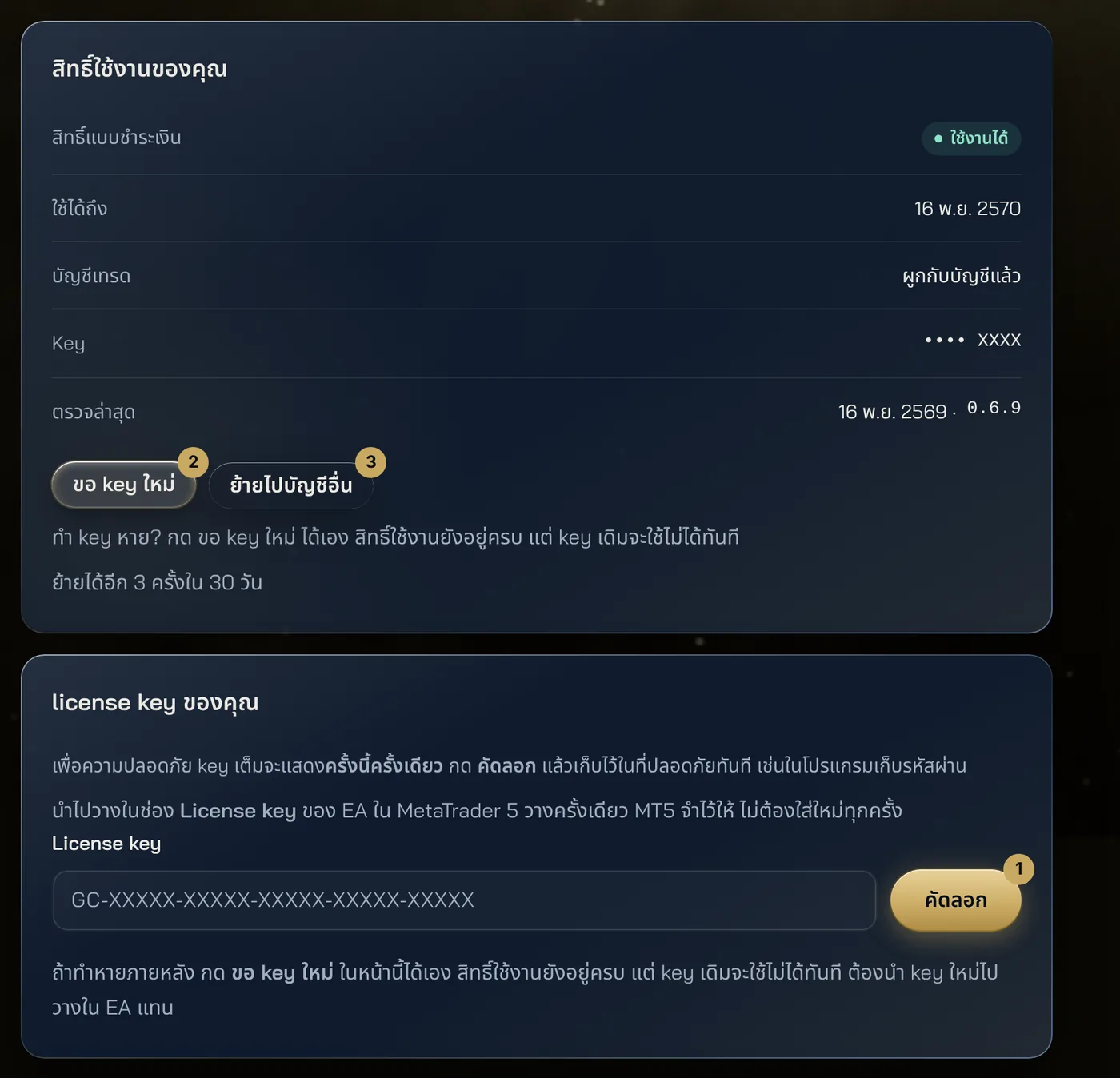
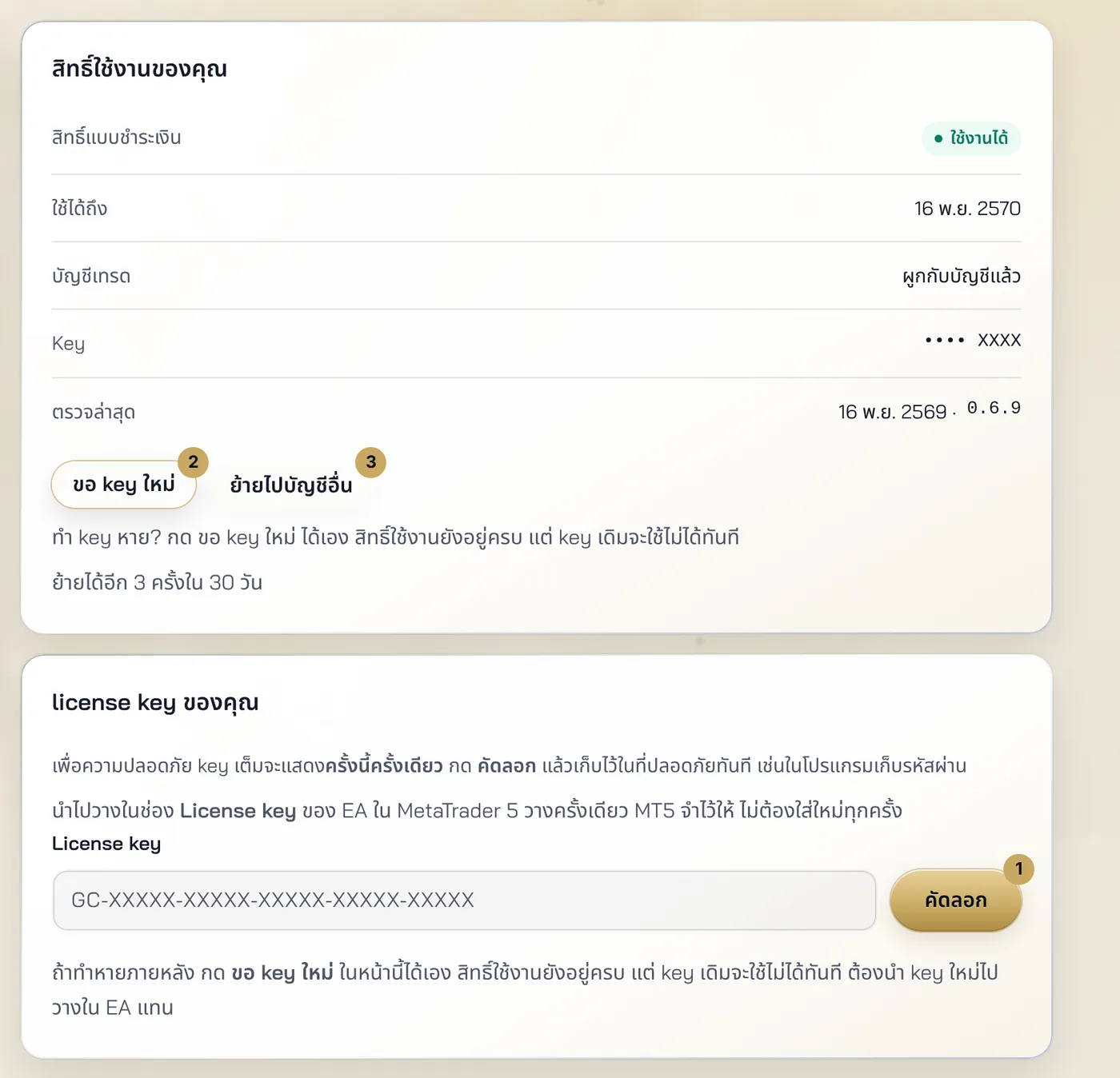
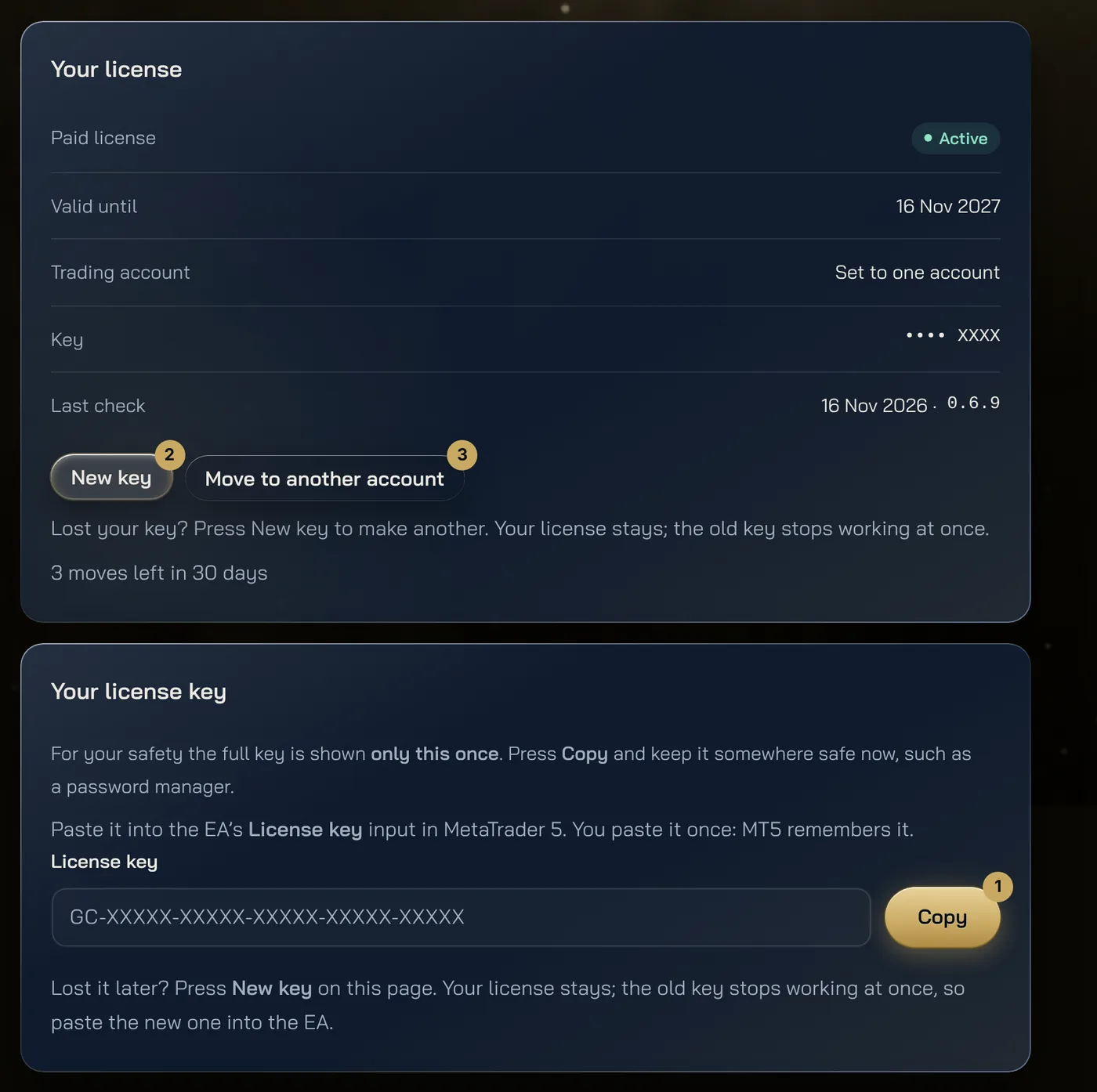
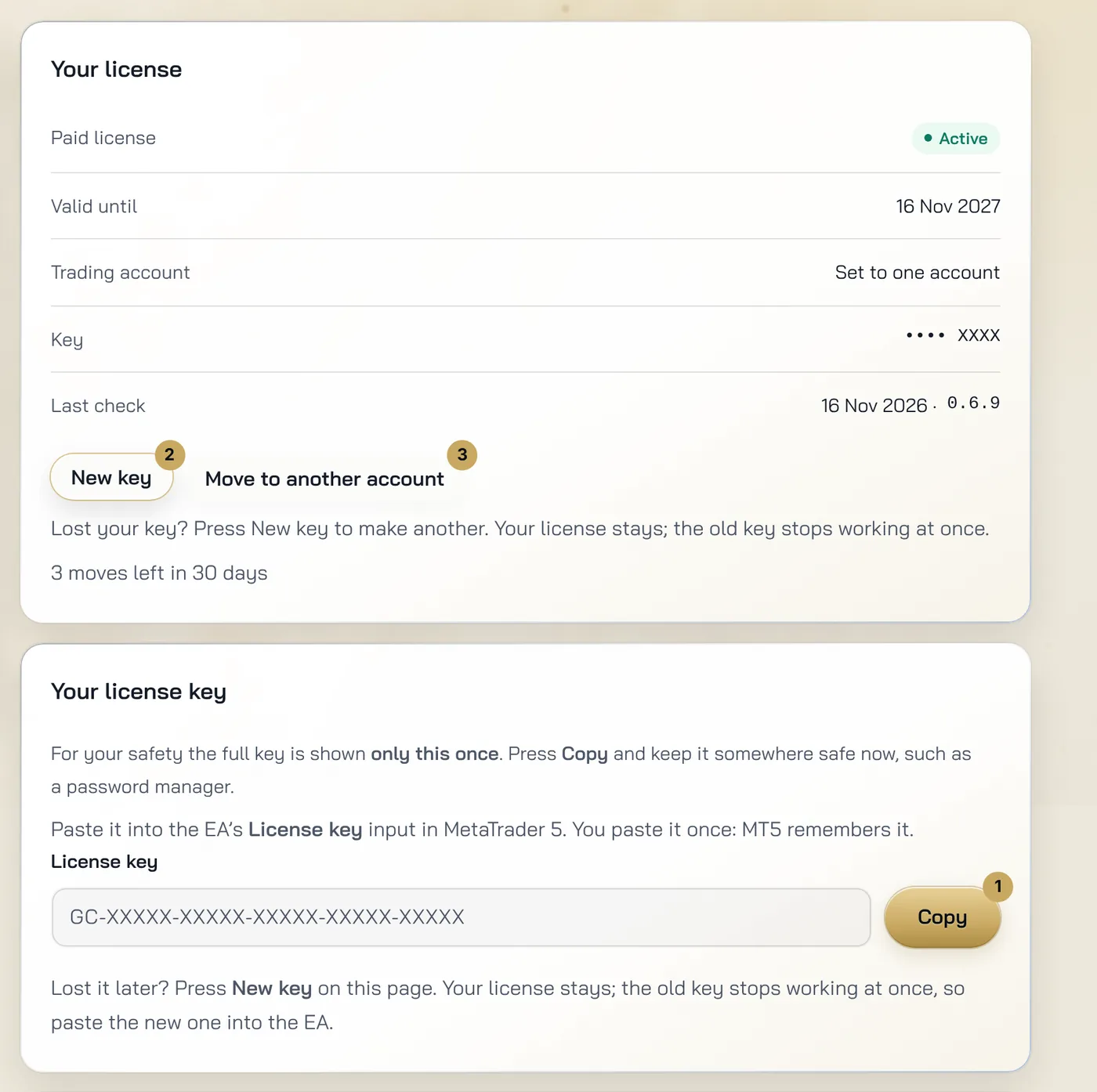
key อยู่ในหน้าสมาชิกบน arxonedge.com (บัญชีของคุณ › EA license) เว็บแสดง key เต็มเพียงครั้งเดียวตอนออก key เพื่อความปลอดภัย กด Copy แล้วเก็บไว้ทันที เช่นในโปรแกรมเก็บรหัสผ่าน ถ้าทำหาย กด New key ในหน้าเดิมเพื่อออก key ใหม่ได้เอง สิทธิ์ใช้งานยังอยู่ครบ แต่ key เก่าจะใช้ไม่ได้ทันที ต้องวาง key ใหม่ใน EA แทน วาง key ใน EA ครั้งเดียว MT5 จำไว้ให้ ไม่ต้องใส่ใหม่ทุกครั้ง ครั้งแรกที่ EA ตรวจสิทธิ์ key จะผูกกับบัญชีเทรดนั้นเอง ไม่ต้องส่งเลขบัญชีให้เรา EA ส่งเพียงรหัสทางเดียวที่สร้างจากเลขบัญชีและ server เราจึงไม่ได้รับเลขบัญชีของคุณ ใช้ key เดียวกันกับบัญชีที่สองไม่ได้Your key is on your member page at arxonedge.com (Your account › EA license). For your safety the full key is shown only once, when it is issued. Press Copy and keep it somewhere safe straight away, such as a password manager. If you lose it, press New key on the same page to issue a new one yourself: your license stays as it is, but the old key stops working at once, so paste the new key into the EA. You paste the key into the EA once; MT5 remembers it. The first time the EA checks it, the key binds itself to that trading account. You never send us your account number: the EA sends only a one-way code made from the account number and server, so we never receive the number. The same key does not work on a second account.
2ย้ายไปบัญชีใหม่Moving to another account
กด ย้ายบัญชี ในหน้าสมาชิก แล้วเปิด EA บนบัญชีใหม่ key จะผูกกับบัญชีใหม่ในการตรวจครั้งถัดไป ย้ายได้ 3 ครั้งใน 30 วัน ถ้าการ์ดขึ้นว่า key ใช้กับบัญชีอื่นอยู่ แปลว่ายังไม่ได้กดย้ายบัญชีPress Move account on your member page, then attach the EA on the new account; the key binds to it at the next check. You can move 3 times in 30 days. If the card says the key is in use on another account, the move was not made yet.
3บัญชี demo: ทดลอง 14 วันDemo accounts: a 14-day trial
บนบัญชี demo เว้นช่อง key ว่างไว้ได้ แต่ละบัญชี demo ทดลองได้ 14 วันนับจากวันแรกที่เปิด EA การ์ดจะบอกว่าเหลือกี่วัน หลังจากนั้น EA จะหยุดเปิดไม้ใหม่บนบัญชีนั้น key ที่ซื้อแล้วใช้กับบัญชี demo ได้ตลอดOn a demo account you can leave the key empty. Each demo account gets 14 days from the first day the EA runs on it, and the card shows the days left. After that the EA opens no new trades on that account. A paid key works on demo accounts at any time.
4การตรวจสิทธิ์และเมื่อสิทธิ์หมดChecks, and when a license ends
EA ตรวจสิทธิ์ตอนเริ่มทำงานและประมาณทุก 6 ชั่วโมง ถ้าเน็ตหลุดหรือเว็บล่ม EA ใช้ผลตรวจล่าสุดต่อได้สูงสุด 72 ชั่วโมง เมื่อสิทธิ์หมดหรือใช้ไม่ได้ EA จะหยุดเปิดไม้ใหม่ แต่ยังดูแลไม้ที่เปิดอยู่ (stop, จุดกันทุน, trailing) จนปิดครบ ต่ออายุแล้วไม่ต้องเปลี่ยน keyThe EA checks at start and about every 6 hours. If the internet or our site is down, it keeps the last answer for up to 72 hours. When a license ends or stops working, the EA opens no new trades but keeps managing open ones (stops, break-even, trailing) until they close. Renewing keeps the same key.
ส่วนที่ 8Part 8
ใช้งานทุกวันDay to day
- อย่าปิดไม้เองDon’t close trades by hand
ไม้ที่ขาดทุนปิดภายในราวหนึ่งชั่วโมง ส่วนไม้ที่ทำกำไรให้ทั้งปีถือราววันครึ่งหรือนานกว่า การปิดไม้ตอนกำไรเล็กน้อยหรือตอนก่อนนอน คือการตัดไม้ที่สำคัญที่สุดทิ้ง และอย่าเลื่อน stop หรือใส่เป้ากำไรเองLosing trades close within about an hour; the trades that pay for the year are held a day and a half or longer. Closing a small profit, or closing before bed, cuts exactly the trades that matter. Don’t move stops or add take-profits either.
- เปิด MT5 ไว้ตลอดKeep MT5 running
ปิดคอมพิวเตอร์หรือ MT5 แล้ว ไม้ที่เปิดอยู่ยังมี stop ที่ฝั่งโบรกเกอร์ แต่จะไม่มีการเลื่อนจุดกันทุน trailing หรือออกตามระบบ ใช้ VPS ถ้าเปิดเครื่องตลอดไม่ได้With the computer or MT5 off, open trades keep their stop at the broker, but nothing moves them to break-even, trails them or exits them by the rules. Use a VPS if you can’t keep a computer on.
- ถือข้ามสุดสัปดาห์ได้Weekends are held
EA ไม่ปิดไม้ก่อนสุดสัปดาห์ ในการทดสอบ การปิดก่อนสุดสัปดาห์ทำให้กำไรลดลงและ drawdown ลึกขึ้น ราคาเปิดวันจันทร์อาจกระโดดข้าม stop ได้The EA does not close before the weekend; in testing, closing on Friday cost profit and deepened drawdowns. Monday’s open can gap past a stop.
- หนึ่งบัญชี หนึ่งกราฟOne account, one chart
เปิด EA บนกราฟทองกราฟเดียวต่อบัญชี และไม่ควรเทรดทองมือในบัญชีเดียวกัน ทุนที่ EA ใช้คำนวณขนาดคือยอดของทั้งบัญชีRun the EA on one gold chart per account, and avoid trading gold by hand in the same account: the EA sizes from the whole account’s balance.
- เปลี่ยนค่าเมื่อไม่มีไม้เปิดChange settings with no trades open
เปลี่ยน Risk level หรือขนาดได้ แต่ควรทำตอนไม่มีไม้เปิดอยู่ ขนาดใหม่มีผลกับไม้ใหม่You can change Risk level or size, best with no trades open. A new size applies to new trades.
ส่วนที่ 9Part 9
ผลที่ควรคาดหวังWhat to expect
ตัวเลขในส่วนนี้มาจากการทดสอบย้อนหลังบน HFM ปี 2025 และ 2026 เป็นภาพประกอบ ไม่ใช่การคาดการณ์ ปีต่อไปอาจดีกว่าหรือแย่กว่านี้The figures here come from backtests on HFM in 2025 and 2026. They illustrate how the system behaves; they are not a forecast, and future years can be better or worse.
1แพ้บ่อย ชนะน้อยครั้งแต่ชนะยาวMany small losses, few long wins
ไม้ส่วนใหญ่ปิดที่จุดกันทุนหรือขาดทุนราวหนึ่งเท่าของความเสี่ยงต่อไม้ (1R) มีราว 1 ใน 10 ไม้ที่วิ่งเกิน 2R และไม้กลุ่มนี้จ่ายให้ทั้งปี ไม้ที่ชนะครึ่งหนึ่งได้เกิน 3R MT5 จะแสดง win rate ราว 60% เพราะนับไม้ที่ปิดที่จุดกันทุนเป็นไม้ชนะ ถ้าไม่นับไม้กลุ่มนี้ ไม้ที่ชนะจริงมีราว 13% เท่านั้น การแพ้ติดกันยาวๆ จึงเป็นเรื่องปกติของระบบนี้Most trades close at break-even or lose about one unit of risk (1R). Roughly 1 trade in 10 runs past 2R, and those trades pay for the year; half of all wins are above 3R. MT5 shows a win rate around 60% because it counts break-even closes as wins; without them, only about 13% of trades are real wins. Long losing streaks are normal for this system.
2มีเดือนที่ขาดทุนThere are losing months
ปี 2026 ขาดทุน 3 จาก 11 เดือน ปี 2025 ขาดทุน 5 จาก 12 เดือน และกำไรของแต่ละปีส่วนใหญ่มาจากสองเดือนที่ดีที่สุด ผลของปี 2025 ได้ราว 37% ของปี 2026 ถ้าเริ่มใช้ตรงช่วงที่ไม่ดี ยอดเงินอาจติดลบอยู่หลายเดือนก่อนจะเจอเดือนที่ดี2026 lost money in 3 of 11 months and 2025 in 5 of 12, and each year’s profit came mostly from its two best months. 2025 made about 37% of what 2026 made. Start at a bad time and the account can sit below its start for months before a good month arrives.
XAUUSD ขนาด 3 × 2 lot 0.01 คงที่ทั้งปี (ไม่ทบต้น) ทุนเริ่ม $1,000 ปิดตัวกันรายวัน ไม่รวมค่าคอมมิชชันและ swap · เงินทุกช่องคูณตาม lot ตรงตัว · ปี 2025 อยู่นอกช่วงที่ใช้จูนระบบ จึงใกล้ผลจริงกว่า · ปี 2026 (5 ม.ค.–13 พ.ย.) เป็นช่วงที่ใช้จูน จึงดูดีกว่าที่จะเกิดจริง · ใน EA จริง Auto เพิ่ม lot ตามทุน ซึ่งขยายทั้งกำไรและขาดทุน และตัวกันรายวันตัดวันที่เสียหนัก ผลจริงจึงต่างไป · ผลในอดีตไม่รับประกันผลในอนาคตXAUUSD, size 3 × 2, a fixed 0.01 lot all year (not compounded), $1,000 start, daily guard off; commission and swap not included · every money figure scales exactly with the lot · 2025 is outside the tuning period, the closer guide to live trading · 2026 (5 Jan–13 Nov) is the tuning period, so it looks better than live trading will · live, Auto raises the lot as the balance grows, which enlarges gains and losses, and the daily guard cuts the worst days, so live results differ · past results do not guarantee future results
| 2025 | 2026 | |
|---|---|---|
| กำไรสุทธิNet profit | +2,741 USD | +7,438 USD |
| Profit factor | 1.33 | 1.64 |
| เดือนที่ขาดทุนLosing months | 5 / 12 | 3 / 11 (ถึง 13 พ.ย.)3 / 11 (to 13 Nov) |
| เดือนดีสุดBest month | +1,413 USD | +2,990 USD |
| เดือนแย่สุดWorst month | −529 USD | −631 USD |
| DD ปิดไม้สูงสุดLargest closed drawdown | 1,060 USD | 861 USD |
| Equity DD สูงสุด รวมไม้ที่ยังเปิดLargest equity drawdown, open tickets included | 1,246 USD | 1,743 USD |
| ไม้ทั้งหมดTickets | 2,064 | 2,559 |
3DrawdownDrawdown
ที่ทุนขั้นต่ำ drawdown ที่เคยเจอคือราว 7% (Very Low) ครึ่งหนึ่ง (Low) สองในสาม (Normal) หรือเกือบทั้งหมด (High) ของทุน (ส่วนที่ 3) ใช้เงินที่เสียได้เท่านั้น และอย่าเพิ่มความเสี่ยงหลังขาดทุนเพื่อเร่งเอาคืนAt the minimum capital, the drawdowns seen were about 7% (Very Low), half (Low), two-thirds (Normal) or nearly all (High) of the balance (Part 3). Use only money you can afford to lose, and don’t raise the risk after a loss to win it back faster.
ส่วนที่ 10Part 10
ทดสอบย้อนหลังBacktesting
ดูว่า EA เทรดอย่างไรบนข้อมูลย้อนหลังของโบรกเกอร์คุณ ก่อนใช้เงินจริง ใช้ Strategy Tester ที่มากับ MT5 ไม่ต้องใช้ license key และไม่มีผลกับบัญชีของคุณ ผลทดสอบเป็นอดีต ไม่ได้รับประกันอนาคตSee how the EA trades on your broker’s past data before you use real money. MT5’s own Strategy Tester needs no license key and does not touch your account. A backtest shows the past; it does not promise the future.
1ตั้งค่า TesterSet up the Tester
ใน MT5 กด Ctrl+R หรือเมนู View › Strategy Tester หน้าต่าง Tester ขึ้นด้านล่าง ไปที่แท็บ Settings แล้วตั้งตามภาพIn MT5 press Ctrl+R, or View › Strategy Tester. The Tester opens at the bottom; go to its Settings tab and set it as in the picture.
- Expert เลือก Arxon Gold Cruiser
- Symbol ทองของโบรกเกอร์คุณ (XAUUSD, GOLD หรือชื่อที่มีตัวต่อท้าย) timeframe เลือกอะไรก็ได้ EA ใช้กรอบเวลาของตัวเอง
- Date เลือก Custom period อย่างน้อยหนึ่งปี ช่วงสั้นกว่านั้นอาจไม่เจอทั้งเดือนดีและเดือนแย่ ช่อง Forward ปล่อยเป็น No
- Delays รอบแรกใช้ Zero latency, ideal execution แล้วค่อยลองแบบอื่น (ตารางใต้ภาพ) ปุ่มข้างช่องนี้เปิดหน้าต่าง Trade Settings (commission, การเทรด, margin) ไม่ต้องติ๊ก Use custom settings เพื่อให้ Tester ใช้ค่าของโบรกเกอร์คุณ
- Modelling เลือก Every tick based on real ticks (แต่ละแบบอธิบายในตารางใต้ภาพ) ช่อง profit in pips for faster calculations ไม่ต้องติ๊ก ผลจะได้เป็นเงินเหมือนในบัญชี
- Deposit เงินทุน สกุลเงิน และ leverage เท่ากับบัญชีที่จะใช้จริง ทุนอย่างน้อยเท่าขั้นต่ำของระดับที่เลือก (ส่วนที่ 3)
- Optimization ตั้งเป็น Disabled แล้วช่อง visual mode จะขึ้นข้าง ๆ ติ๊กเมื่ออยากดูการ์ดและเครื่องหมายไม้บนกราฟ (ช้ากว่า) ทดสอบทั้งปีไม่ต้องติ๊ก
- ตั้งแท็บ Inputs (หัวข้อ 2) แล้วกด Start
- Expert: choose Arxon Gold Cruiser.
- Symbol: your broker’s gold (XAUUSD, GOLD or a name with a suffix). Any timeframe; the EA uses its own.
- Date: a Custom period of at least one year; a shorter one may miss both the good and the bad months. Leave Forward on No.
- Delays: Zero latency, ideal execution for the first run, then try the others (table below the picture). The button beside it opens Trade Settings (commissions, trading, margins); leave Use custom settings unticked so the Tester uses your broker’s own.
- Modelling: Every tick based on real ticks (each mode is explained in the table below the picture). Leave profit in pips for faster calculations unticked, so results are in money, as on your account.
- Deposit, currency and leverage: the same as the account you will use, and at least the minimum for your risk level (Part 3).
- Optimization: Disabled; the visual mode box then shows beside it. Tick it to watch the card and trade marks on the chart (slower); leave it off for a full year.
- Set the Inputs tab (section 2), then press Start.
Modelling คือวิธีที่ Tester สร้างราคาให้ EAModelling is how the Tester feeds prices to the EA.
| แบบMode | ทำอะไรWhat it does | กับ Gold CruiserFor Gold Cruiser |
|---|---|---|
Every tick based on real ticks | ใช้ tick จริงที่โบรกเกอร์เก็บไว้ spread เปลี่ยนได้ภายในนาทีเหมือนตลาดจริง นาทีที่ไม่มีข้อมูล tick จริง Tester สร้าง tick ให้แทน (ดูได้จาก History Quality) ครั้งแรกโหลดนานUses the real ticks your broker stored; the spread can change within a minute, as in the market. For a minute with no real ticks the Tester generates them instead (History Quality shows how much). The first download is slow. | ใช้แบบนี้ ใกล้ของจริงที่สุด EA เลื่อน stop ตามราคาทุก tick และตัวกรอง Max spread $ ทำงานกับ spread จริงUse this. The closest to real trading: the EA moves its stops on every tick, and Max spread $ works on the real spread. |
Every tick | Tester สร้าง tick ขึ้นเองจากแท่ง 1 นาที spread คงที่ทั้งนาที ละเอียดแต่ไม่ใช่ราคาจริงThe Tester makes up ticks from the 1-minute bars, with one fixed spread for the whole minute. Detailed, but not the real prices. | ใช้แทนได้ถ้าโบรกเกอร์ไม่มีข้อมูล tick จริง ผลคลาดจากจริงมากกว่าA fallback when your broker has no real ticks; further from real results. |
1 minute OHLC | ใช้แค่ 4 ราคาของแต่ละแท่ง 1 นาที (เปิด สูง ต่ำ ปิด)Only four prices per 1-minute bar: open, high, low, close. | ไม่แนะนำ การเลื่อน stop และจุดกันทุนภายในนาทีคลาดเคลื่อนNot recommended: stop moves and break-even within the minute come out wrong. |
Open prices only | EA ทำงานเฉพาะตอนเปิดแท่งของ timeframe ที่เลือก stop อาจปิดที่ราคาต่างจากที่ตั้งThe EA runs only when a bar of the chosen timeframe opens; stops can fill at a different price. | ไม่เหมาะกับ EA นี้ ผลไม่สะท้อนการทำงานจริงNot for this EA; the result does not show how it really trades. |
Math calculations | ไม่มีราคาเลย ใช้กับงานคำนวณทางคณิตศาสตร์No prices at all; for math-only calculations. | ใช้กับ EA นี้ไม่ได้Does not work for this EA. |
Delays คือความล่าช้าระหว่างที่ EA ส่งคำสั่งจนได้ราคา ใช้กับคำสั่งของ EA เท่านั้นDelays is the wait between the EA sending an order and getting its fill; it applies only to the EA’s orders.
| แบบMode | ทำอะไรWhat it does | ใช้เมื่อไรWhen to use |
|---|---|---|
Zero latency, ideal execution | ทุกคำสั่งได้ราคาที่ขอทันที ไม่มีความล่าช้าEvery order fills at the requested price at once, with no delay. | ใช้รอบแรก ดูว่า EA ทำงานอย่างไรในสภาพที่ดีที่สุดFor the first run: how the EA does in ideal conditions. |
253 ms (last ping to your server is 253.05 ms) | หน่วงเท่า ping ล่าสุดจากเครื่องที่รัน MT5 ไปยัง server โบรกเกอร์ ตัวเลขในชื่อเป็นของเครื่องคุณเอง (253 ms เป็นตัวอย่าง)Waits as long as the last ping from the computer running MT5 to the broker’s server; the number in the name is your own (253 ms is an example). | ใกล้สภาพจริงที่สุด ถ้าเทรดจริงบน VPS ให้รัน Tester บน VPS นั้น หรือเลือกค่าคงที่ใกล้ ping ของ VPSThe closest to real. If you trade on a VPS, run the Tester on that VPS, or pick the fixed value nearest its ping. |
1 ms … 1000 ms | หน่วงทุกคำสั่งเท่ากันตามค่าที่เลือก (1, 5, 10, 20, 50, 100, 500 หรือ 1000 ms)Every order waits the value you pick (1, 5, 10, 20, 50, 100, 500 or 1000 ms). | ใช้ดูว่าผลเปลี่ยนแค่ไหนเมื่อคำสั่งช้าลงทีละขั้นTo see how the result changes as orders get slower, step by step. |
Random delay | สุ่มหน่วงแต่ละคำสั่ง 0–8 วินาทีราว 90% ของครั้ง และ 9–18 วินาทีที่เหลือ ราคาเปลี่ยนได้ระหว่างรอEach order waits a random 0–8 seconds about 90% of the time and 9–18 seconds otherwise; the price can move while it waits. | รันซ้ำเพื่อดูว่าผลแย่ลงแค่ไหนเมื่อคำสั่งช้า หนักกว่า VPS ที่ดีมาก จึงเป็นกรณีแย่Run again to see how much worse it gets when orders are slow. Much slower than a good VPS, so treat it as a bad case. |
Custom delay ... | ตั้งค่าหน่วงเองSet a delay of your own. | เมื่อรู้ค่าหน่วงจริงของบัญชีคุณWhen you know your account’s real delay. |
2แท็บ InputsThe Inputs tab
แท็บ Inputs ของ Tester มีช่องเดียวกับตอนติดตั้ง (ส่วนที่ 5) เลือก Risk level ที่จะใช้จริง ช่อง License key เว้นว่างได้ แผงตั้งค่าบนกราฟใช้ใน Tester ไม่ได้เพราะ Tester คลิกไม่ได้ และค่าที่เคยปรับในแผงบนกราฟจริงจะไม่ถูกใช้ Tester ใช้ค่าในแท็บนี้อย่างเดียวThe Tester’s Inputs tab has the same fields as when you attach the EA (Part 5). Choose the Risk level you will use; License key can stay empty. The settings panel does not work in the Tester (it cannot be clicked), and values you changed in the panel on a live chart are not used: the Tester runs on this tab only.
3เริ่มทดสอบRun it
กด Start ครั้งแรก MT5 จะโหลดข้อมูล tick ของช่วงที่เลือกจากโบรกเกอร์ ซึ่งอาจใช้เวลานานและใช้พื้นที่ดิสก์มาก ครั้งต่อไปจะเร็วขึ้น ถ้าเปิด Visual mode การ์ดสถานะขึ้นเหมือนบนกราฟจริง แถว License เป็น Strategy Tester ตัวกันขาดทุนรายวันทำงานเหมือนบัญชีจริงPress Start. The first time, MT5 downloads the tick data for the period from your broker, which can take a while and use a lot of disk space; later runs are faster. In Visual mode the status card shows as on a live chart, with License Strategy Tester; the daily guard works as on a real account.
4อ่านผลReading the results
เมื่อรันจบ แท็บ Backtest จะขึ้นใน Tester ผลอยู่ในแท็บนั้น บรรทัดที่ควรดู:When the run ends, a Backtest tab appears in the Tester; the result is there. The lines to look at:
| บรรทัดLine | หมายถึงMeans | ดูอะไรLook for |
|---|---|---|
History Quality | ข้อมูล tick ของช่วงที่ทดสอบครบแค่ไหนHow complete the tick data for the period is. | ควรใกล้ 100% ถ้าต่ำกว่านั้นผลเชื่อได้น้อยลงShould be near 100%; lower means a less reliable result. |
Total Net Profit | กำไรสุทธิทั้งช่วง หลังหัก commission และ swap ตามที่โบรกเกอร์ตั้งไว้Net profit over the period, after the broker’s commission and swap. | — |
Profit Factor | กำไรรวมหารด้วยขาดทุนรวม มากกว่า 1 คือได้กำไรGross profit divided by gross loss; above 1 is a profit. | — |
Equity Drawdown Maximal | equity ลดลงจากจุดสูงสุดลึกที่สุดเท่าไร (เงินและ %)The deepest fall of equity from a peak, in money and %. | เทียบกับระดับที่เลือก (ส่วนที่ 3) และส่วนที่ 9 ข้อ 3Compare with your risk level (Part 3) and Part 9, item 3. |
Total Trades | นับทีละไม้ ตะกร้าหนึ่งมีหลายไม้ตามขนาด (ส่วนที่ 3)Counts every ticket; one basket holds several, by size (Part 3). | — |
Profit Trades (% of total) | MT5 นับไม้ที่ปิดที่จุดกันทุนแล้วได้กำไรนิดหน่อยเป็นไม้ชนะ ระบบนี้มีไม้แบบนี้มาก (ส่วนที่ 9)MT5 counts a trade closed at break-even with a small profit as a win; this system has many of those (Part 9). | % นี้จึงสูงกว่าไม้ที่ชนะยาวจริงSo this % is higher than the share of real long wins. |
Graph | แท็บ Graph เส้น balance และ equity ตลอดช่วงThe Graph tab: balance and equity over the period. | ดูช่วงที่ลงลึกและเดือนที่ขาดทุนLook at the deep dips and the losing months. |
5ข้อควรรู้Good to know
- แต่ละโบรกเกอร์ได้ผลต่างกันEach broker gives a different result
spread, commission, swap และข้อมูล tick ต่างกัน Tester ใช้ spread จริงจากข้อมูล tick ช่วงที่ spread กว้างกว่า Max spread $ EA ก็ไม่เข้าไม้เหมือนบนบัญชีจริงSpread, commission, swap and tick data differ. The Tester uses the real spread from the tick data, so when it is wider than Max spread $ the EA skips the entry, as on a real account.
- ลองหลายวันเริ่มTry several start dates
ผลขึ้นกับเดือนที่เริ่ม ถ้าเริ่มในเดือนที่แย่ drawdown จะลึกกว่า ลองเริ่มต้นเดือนต่างกันหลายรอบ เพื่อดูว่าแย่สุดเป็นอย่างไรThe result depends on the month you start in; starting in a bad month gives a deeper drawdown. Run it from several different months to see the worst case.
- บัญชี centCent accounts
ทดสอบบน XAUUSD ปกติด้วยตัวเลขเดียวกันเป็น USD (เช่น 900 USC → 900 USD) ผลเป็น % ใกล้เคียงกัน แต่ spread ของบัญชี cent กว้างกว่า ผลจริงจึงมักต่ำกว่า (ส่วนที่ 3)Test on the standard XAUUSD with the same number in USD (900 USC → 900 USD); the result in % is close, but a cent account’s wider spread usually makes the real result lower (Part 3).
- บัญชีจริงมี slippageReal accounts have slippage
คำสั่งจริงอาจได้ราคาคลาดและช้ากว่าใน Tester ผลจริงจึงต่างจากผลทดสอบได้ ใช้ผลทดสอบเพื่อเข้าใจพฤติกรรมของ EA ไม่ใช่เป็นตัวเลขที่จะได้Real orders can fill at a different price and later than in the Tester, so real results differ. Use a backtest to understand how the EA behaves, not as the number you will get.
ส่วนที่ 11Part 11
คำถามที่พบบ่อยFAQ
- ทำไมวันนี้ไม่เปิดไม้Why no trades today?
ส่วนใหญ่เพราะยังไม่มีทิศหรือจังหวะครบ (ดู Direction / Setup / Trigger บนการ์ด) หรือ spread กว้างเกิน ตัวกันรายวันหยุดไว้ ทุนต่ำกว่าขั้นต่ำ หรือสถานะ License ไม่ใช่ Active บางวันไม่มีไม้เลยเป็นเรื่องปกติUsually no direction or timing yet (see Direction / Setup / Trigger on the card), a spread above the limit, the daily guard, a balance under the minimum, or a License status other than Active. Some days have no trades at all; that is normal.
- ใช้กับคู่เงินอื่นได้ไหมCan I use it on other symbols?
ไม่ได้ ทุกระยะในระบบตั้งและทดสอบบนราคาทองเท่านั้น บนคู่อื่นค่าเหล่านี้ไม่มีความหมายNo. Every distance in it was set and tested on gold prices only; on other symbols they mean nothing.
- ใช้กับบัญชี prop firm ได้ไหมCan I use it on a prop-firm account?
บัญชี challenge ส่วนใหญ่เป็นบัญชีแบบ demo ต้องใช้ key ที่ซื้อแล้ว เพราะช่วงทดลอง 14 วันมีไว้ให้ลองระบบ และควรตรวจกฎของ prop firm เรื่อง EA, ขีดขาดทุนรายวัน และการถือข้ามสุดสัปดาห์ก่อนใช้Most challenge accounts are demo-type and need a paid key; the 14-day trial is for trying the system. Check the firm’s rules on EAs, daily loss limits and holding over the weekend first.
- ปิด-เปิด MT5 ระหว่างวันได้ไหมCan I restart MT5 during the day?
ได้ EA จำยอดเงินต้นวันและสถานะของตัวกันรายวันไว้ เปิดใหม่แล้วทำงานต่อจากเดิม แต่ระหว่างที่ปิดไม่มีใครดูแลไม้ที่เปิดอยู่Yes. The EA remembers the day-start balance and the daily guard, and carries on. While MT5 is closed, nobody manages the open trades.
- ฝากหรือถอนเงินแล้ว ขนาดไม่เปลี่ยนI deposited or withdrew, and the size didn’t change
ขนาดคำนวณวันละครั้งตอนเริ่มวันของ server จะเปลี่ยนในวันถัดไปSize is set once a day at the start of the server day; it changes the next day.
- ใช้กับ MT4 ได้ไหมDoes it run on MT4?
ไม่ได้ ใช้ได้กับ MetaTrader 5 เท่านั้นNo, MetaTrader 5 only.
- ผลจริงต่างจากผลทดสอบMy results differ from the tests
spread, ค่าคอมมิชชัน, swap และความเร็วในการส่งคำสั่งของแต่ละโบรกเกอร์ทำให้ผลต่างกัน วันเริ่มต้นก็มีผลมาก (ส่วนที่ 9) ดูผลเป็นหลายเดือน ไม่ใช่หลายวันSpreads, commission, swaps and execution differ by broker, and the start date matters a lot (Part 9). Judge it over months, not days.
คำเตือนความเสี่ยงRisk disclosure
การเทรดทองคำและผลิตภัณฑ์ที่ใช้อัตราทดมีความเสี่ยงสูง คุณอาจขาดทุนเงินบางส่วนหรือทั้งหมดที่ลงไป Arxon Gold Cruiser เป็นซอฟต์แวร์ที่ส่งคำสั่งตามกฎที่ตั้งไว้ ไม่ใช่คำแนะนำการลงทุน Arxon Edge ไม่ใช่โบรกเกอร์หรือที่ปรึกษาการลงทุนที่ได้รับใบอนุญาต และไม่ได้เข้าถึงหรือบริหารบัญชีเทรดของคุณ ผลการทดสอบย้อนหลังไม่ได้รับประกันผลในอนาคต ทดสอบบนบัญชี demo ก่อนใช้กับเงินจริงTrading gold and other leveraged products carries a high level of risk; you can lose some or all of the money you put in. Arxon Gold Cruiser is software that places orders by fixed rules; it is not investment advice. Arxon Edge is not a broker or a licensed investment adviser, and does not access or manage your trading account. Backtest results do not guarantee future results. Test it on a demo account before using real money.